
Tested July 26, 2026 · HyperFrames MCP connector, hosted path · Claude web
Our Instagram reels had a problem we could name precisely: they were still images with a slow zoom on top. Ken Burns, a caption, a crossfade, repeat. The distribution was fine. The result was nothing, because a video that doesn’t move is a slide that costs more to make.
So when the HyperFrames MCP connector appeared in Claude’s directory promising motion graphics from a text description, we didn’t approach it as a review assignment. We approached it as a fix for a production problem we already had. Three renders and an hour and a quarter later, we had nothing we could publish.
One thing up front, because it decides how much this piece is worth to you. Three attempts in one sitting is not a test of what HyperFrames can do at its ceiling. It is a test of one specific claim: that you can describe the video you want and the agent handles the rest. Against that claim, an hour and a quarter is a generous sample. Against the framework itself, it isn’t — and we’ll be explicit later about the part we didn’t touch.
Two doors, and we only opened one
Almost everything written about HyperFrames so far describes a different product than the one in Claude’s connector list, and the confusion is worth clearing up before anything else.
Door one is the open-source framework. HyperFrames is a rendering engine from HeyGen, the company better known for AI avatar video, released under Apache 2.0. It turns HTML compositions into video: you write a web page, animate it with CSS or GSAP, and render it to MP4 from a command line. It’s free, it runs on your machine, and the developer coverage of it is genuinely enthusiastic — most of it benchmarks HyperFrames against Remotion on render times and file sizes.
Door two is the hosted MCP connector. Same engine underneath, but wrapped in an authoring agent that writes the HTML for you, plus cloud rendering on HeyGen’s infrastructure. No install, no terminal, no code. You type a sentence in a Claude chat and a video comes back.
We tested door two. Everything below applies to the connector, not to the framework.
What we asked for
The brief was deliberately unambitious, because we wanted something shippable rather than something impressive: vertical 9:16 at 1080×1920, around 25 seconds total, scenes of roughly 2.4 seconds each, no voiceover, and no third-party logos. That last constraint is house policy — we only publish other companies’ marks when they come from an official brand kit, never a rendered approximation.
Three renders, measured
Rather than argue about whether the output “felt” static, we measured it. Each render was sampled at 4 frames per second, and consecutive frames were compared pixel by pixel. A frame counted as moving if more than 0.5% of its area changed by more than 12 levels out of 255. Anything below that is a still image with compression noise.
| Render 1 | Render 2 | Render 3 | |
|---|---|---|---|
| Format | 1080×1920 ✅ | 1920×1080 ❌ | 1080×1920 ✅ |
| Duration | 53.4s (asked 24–26) | 52.6s (asked 24) | 27.0s (asked 24) |
| Voiceover | Present, not requested | Present, not requested | Present, not requested |
| Frozen frames | 53% | 57% | 67% |
| Third-party logos | Present | Present | Present, explicitly banned |
Read the last row and the last column together. By the third attempt we had stopped asking politely and written the constraint as a hard rule in the prompt. The logos came back anyway.
The eight seconds that worked
Here is the part that stops this from being a hit piece, and it’s the most useful finding in the whole test.
Inside the first render there is a continuous block of roughly eight seconds of genuine, frame-by-frame motion. Not a zoom. Not a fade. Real animation, the kind we’d been trying and failing to produce by hand. The engine can do this. The rendering layer is not the problem.
Which locates the failure precisely: the problem is the agent sitting on top of the engine, not the engine. That also explains why developer reviews of HyperFrames are so positive and our experience was so different. They’re driving the engine directly. We asked something else to drive it for us.
Three failures a better prompt won’t fix
1. Hard specs don’t survive the next request
Render one came back vertical, as asked. We sent a follow-up asking for changes to the content — nothing about dimensions — and render two came back landscape. The agent doesn’t treat format and duration as settings that persist. Each request re-derives the canvas from scratch.
The practical rule, if you use this: restate every hard specification in full, every single time. A follow-up message is a new brief, not an edit.
2. A voiceover we never asked for, three times out of three
Every render arrived with synthetic narration. We never requested it once.
What makes this worth your attention is how nearly we missed it. The job metadata reported voice_token: null, which reads like a clean confirmation that no voice was generated. It wasn’t. Opening the audio tracks showed a mono MP3 running exactly the length of the clip — the narration — alongside a longer stereo WAV, which was the music bed.
The lesson generalizes well beyond this connector, and it’s one of the more expensive habits to unlearn when you start giving Claude tools that act on your behalf: a metadata field is a description of the output, not the output. When a claim matters, open the file.
3. The voiceover inflates the runtime
The two failures compound. Because narration was generated for each scene, scene length was driven by voice_duration_s — six to eight and a half seconds — rather than the 2.4 seconds we specified. That’s the whole explanation for a 25-second brief coming back at 53 seconds, and it’s why the frozen-frame percentage is so high: the visuals finish, the voice keeps going, the frame sits there.
The tool files a report against itself
HyperFrames validates compositions before rendering and writes what it finds to disk. We went looking, and the project’s own lint output flagged unscoped GSAP selectors, a timeline ID mismatch, missing data-start attributes, and a composition root nested inside a <template> tag.
Those aren’t aesthetic complaints. A timeline that can’t find its own elements is a timeline that doesn’t animate them — which is a fairly direct account of where the frozen 53% came from. The system knew its output was broken and rendered it anyway.
What it actually looks like
Numbers only take you so far. In the third render, the word “Metered” was rendered upside down — not rotated as a design choice, simply inverted. It sat there, static, for the length of the scene.
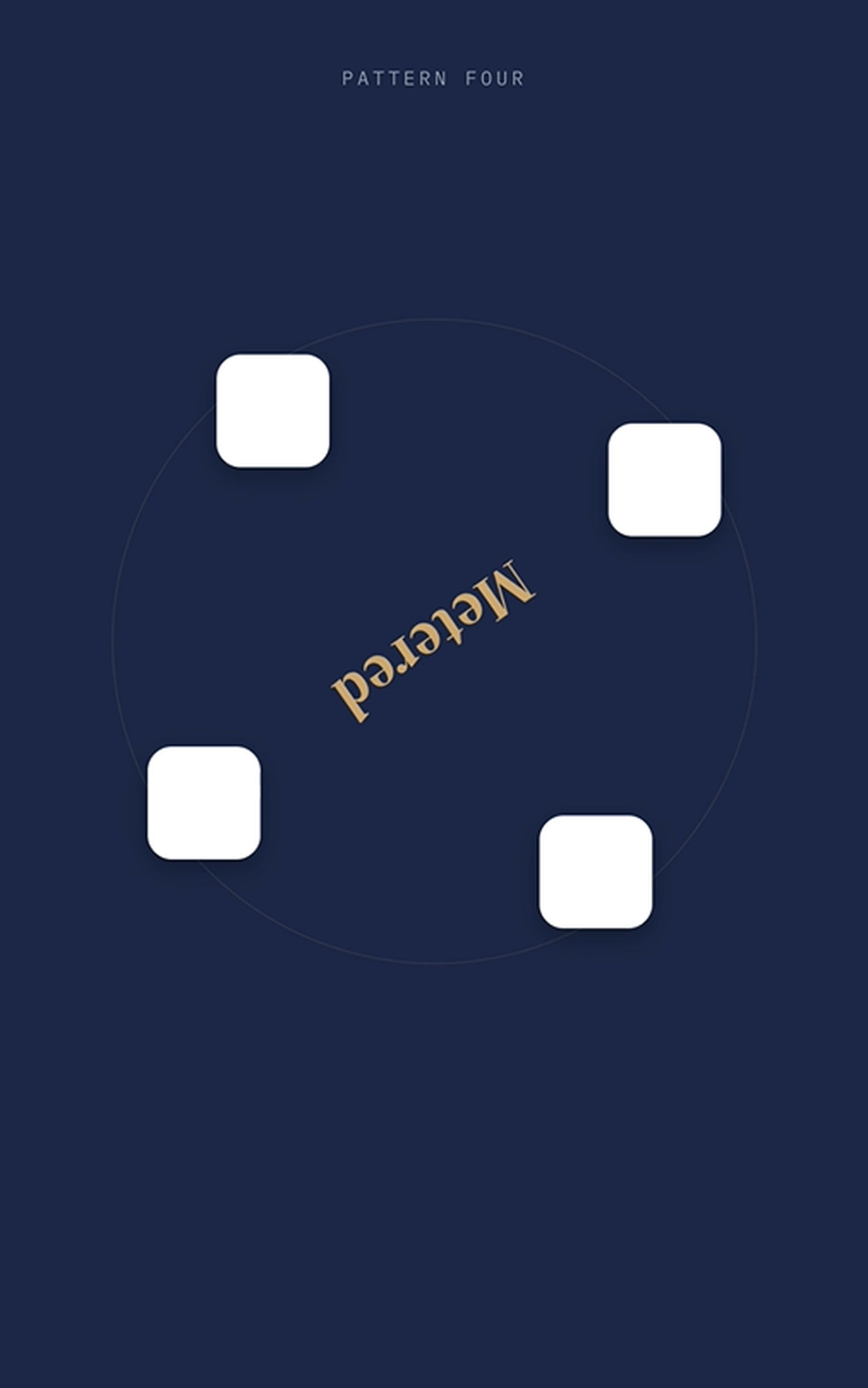
That was the clearest artifact, but not the only one. Across all three renders the typography was inconsistent in size and weight from scene to scene, the contrast between text and background sat below what a phone screen in daylight needs, the generated logos were small and crudely drawn, and the narration was audibly synthetic in the way that makes a viewer trust a brand less, not more.
HeyGen already told us this
Here’s the part we didn’t expect to find, and it reframes the whole test.
HeyGen’s own help center is candid about who HyperFrames is for. It says the framework suits people comfortable working with code or with AI coding tools, notes that you’ll still be running terminal commands, and points anyone who wants a no-code video experience toward the main HeyGen platform instead.
Now put that beside the MCP connector’s pitch. The hosted agent is described as carrying more than twenty-five built-in skills covering typography, color palettes, motion principles and captions, with the explicit assurance that you don’t need to specify any of it — describe the video, and the agent picks the right tools. Claude’s own connector listing offers, as an example prompt, a thirty-second motion graphic of quarterly funnel metrics with animated charts and Swiss-style typography.
Typography and color were the two things our renders got most obviously wrong. The vendor’s documentation and the marketing around the connector are describing two different products, and our test lands squarely on the side of the documentation.
What it costs
The connector is free to add. The framework is free to run locally. The MCP path is neither, quite: it requires a HeyGen account, it consumes render credits, and cloud rendering is billed per minute of finished output.
That makes HyperFrames a textbook case of a pattern worth recognizing before you connect anything — the free connector that reaches into a metered service. Nothing is misrepresented; the meter is simply somewhere other than where you were looking. It’s the same shape as the X connector, where a free integration sits on top of a pay-per-use API.
In our case the cost was mostly time. But note what “billed per minute of output” means when the agent returns 53 seconds for a 25-second brief: you pay for the inflation too.
Who this is for right now
If you write code, or work in Claude Code: the enthusiasm is earned. Deterministic rendering, HTML as the timeline, no proprietary editor format, and an engine that demonstrably produces real motion. Go through door one.
If you’re a creator hoping a chat will hand you a finished reel: not yet. Not because the output is unusable in principle, but because getting it usable requires knowing what a timeline ID mismatch is — which is exactly the knowledge the no-code promise says you won’t need.
There is a real use in between, and it’s where we’d point most people. Stop asking for a whole video. Ask for one animated block — a chart that draws itself, a kinetic title card, a data reveal — and drop it into an edit you control in a normal editor. Eight seconds of genuine motion is a bad 25-second reel and an excellent 8-second insert. Scoped that way, the connector delivers something you cannot easily make by hand, which is the only reason to add a connector at all.
What we haven’t tested
The local route — cloning the repository, installing the CLI, previewing in a browser and editing the composition HTML directly — bypasses the authoring agent entirely. Given that our failures all sit in the agent layer and none in the engine, that route may well work where this one didn’t.
We haven’t run it, so we’re not going to tell you how it goes. We’ll say only that it stops being “make a video by describing it” and starts being “write and debug animation code,” which is a different job for a different audience. If we test it, you’ll read about it here.
The verdict
HyperFrames is a real piece of engineering with a real capability, wrapped in an agent that isn’t ready to be trusted with an unattended brief. The engine animates. The layer that’s supposed to save you the work is currently the part that creates it.
This is also the fastest-moving layer in the whole stack, which is why the test date sits at the top of this page. If HeyGen tightens the agent, the eight seconds we found by accident become the default, and this piece dates quickly. We’d be glad to update it.
Until then: we went in looking for a fix to a production problem and came out without one. That’s a result worth publishing, and it’s the honest half of testing tools in public. Sometimes the answer is that the thing everyone is excited about isn’t for you yet.
Building your stack with Claude?
The Claude MCP Playbook collects our tested setups into one practical guide. Founding price for early readers. Join the waitlist.
You Might Also Like
More connectors we put through the same treatment — including the ones where the promise and the reality didn’t line up.
Related Posts