
Every AI newsletter has told you that Claude Skills exist. Almost none of them have told you the thing you actually need to know: when you should build a Skill instead of connecting an MCP server.
The two get talked about in the same breath, as if they were competing features. They are not. They solve different problems, and if you pick the wrong one you either spend an afternoon writing instructions for a job that needed a connector, or you wire up a connector for a job that needed three paragraphs of guidance.
So we built one. A real Skill, uploaded to a real account, invoked with a plain-English request. Below is what happened, including the part where the official documentation sent us to the wrong menu.
What a Skill actually is
A Skill is a folder you hand to Claude. Inside it there is a file called SKILL.md that says what the job is and how you want it done, and optionally some reference documents and scripts.
The clever part is when Claude reads it. At all times Claude only holds the Skill’s name and one-line description in memory — a rounding error, a hundred tokens or so. Only when your request matches that description does Claude go and read the instructions. And only if the instructions point at a reference file or a script does it open those. Anthropic calls this progressive disclosure. In plain terms: you can install a lot of Skills and none of them cost you anything until the moment one is needed.
That is the mechanism. Now the useful question.
The distinction nobody spells out
Here it is in one line.
An MCP connector answers “what can Claude reach?” A Skill answers “how should Claude do this?”
The connector is the hands. It gives Claude access to a system that lives outside the chat — your Shopify orders, your Gmail, your analytics. Without it, Claude simply cannot see that data, no matter how well you write your prompt.
The Skill is the recipe. It carries no access to anything. It carries method: your standards, your format, the order of operations, the mistakes you don’t want repeated.
They stack. A connector pulls last week’s numbers out of your analytics account; a Skill decides what the report looks like when those numbers arrive.
| Question | You need |
|---|---|
| The information lives in another app | MCP connector |
| Claude has to change something outside the chat | MCP connector |
| You keep pasting the same instructions into every new chat | Skill |
| The output has to look the same every single time | Skill |
| You want a job done a specific way, on data Claude already has | Skill |
| Both of the above | Both — they compose |
What we built, and why that one
We picked a job we do every week: turning a headline and three steps into a vertical Pinterest graphic, 1000 by 1500 pixels, same layout every time.
It was a deliberate choice. This job touches no external service at all, which makes it a clean test — if the Skill works, it works on procedure alone, with nothing borrowed from a connector. It also produces a picture, so there is something to look at rather than another wall of text.
The folder had four files:
SKILL.md— what to collect from the user, and the command to runreference/BRAND.md— the hex codes and the tone rulesreference/LAYOUT.md— the fixed vertical zones of the graphicscripts/build_pin.py— the script that draws the thing
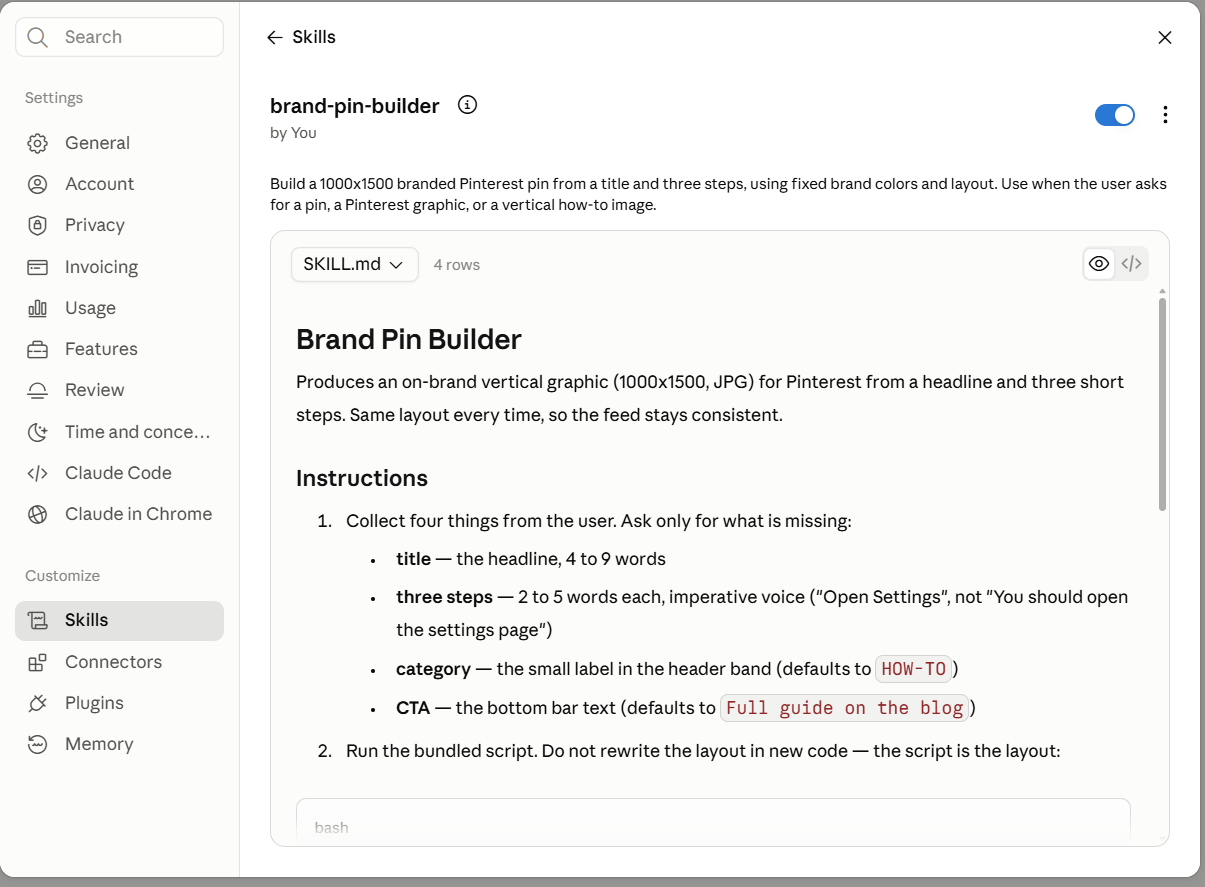
Two rules mattered more than the rest. The name field has to be lowercase with hyphens and cannot contain the words “claude” or “anthropic”. And the description is the only thing Claude reads before deciding whether your Skill is relevant, so it has to say both what the Skill does and when to reach for it. Ours ran to about 190 characters, which we kept deliberately short — more on why in a moment.
Installing it: the documentation is wrong
To upload a Skill you zip the folder. One detail trips people up: the folder itself has to be the root of the archive. If you select the four files and compress those, the upload will not behave.
Then you go to settings. And here is where the official documentation lets you down. The developer docs tell you to look under Settings > Features. The help centre article tells you Settings > Capabilities. In the account we tested, on 25 July 2026, it is neither.
It is Settings > Skills, sitting in the sidebar under a heading called “Customize”, next to Connectors, Plugins and Memory.
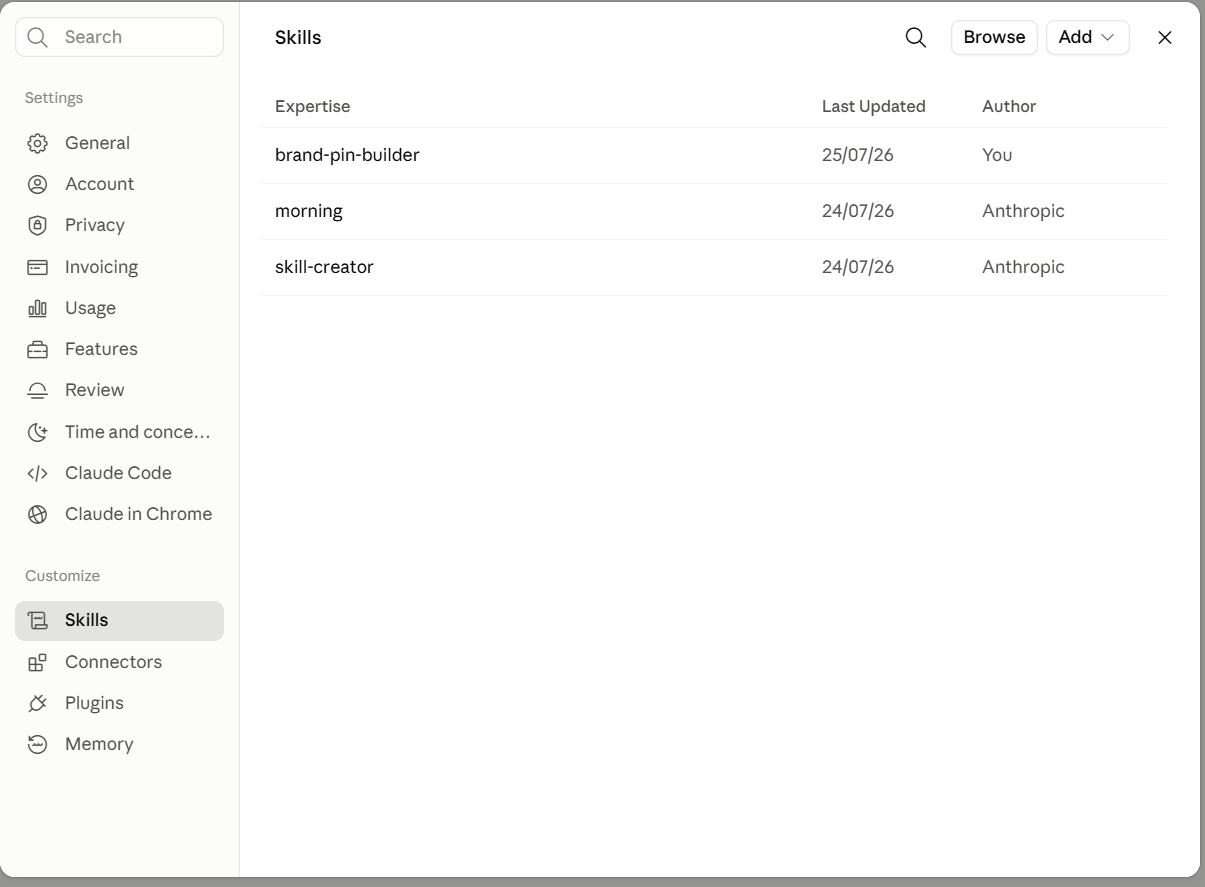
Two things worth noticing in that panel while you are there. There is a Browse button, so a catalogue exists rather than only your own uploads. And two Skills were already sitting in the account, authored by Anthropic rather than by us. You are not starting from an empty room.
Upload the zip, flip the toggle on, and the Skill is live. The detail view renders your SKILL.md back at you and lists the bundled files, which is a fast way to confirm the archive was built correctly.
What happened when we asked
New chat. No mention of the Skill, no instructions, no attached files. One sentence:
Make me a pin for the Notion MCP guide. Steps: Open Settings, Add the connector, Approve access.
Claude did not ask a single follow-up question. It matched the request against the description, then went and fetched what it needed — and this is the part worth watching, because you can see the mechanism happen:
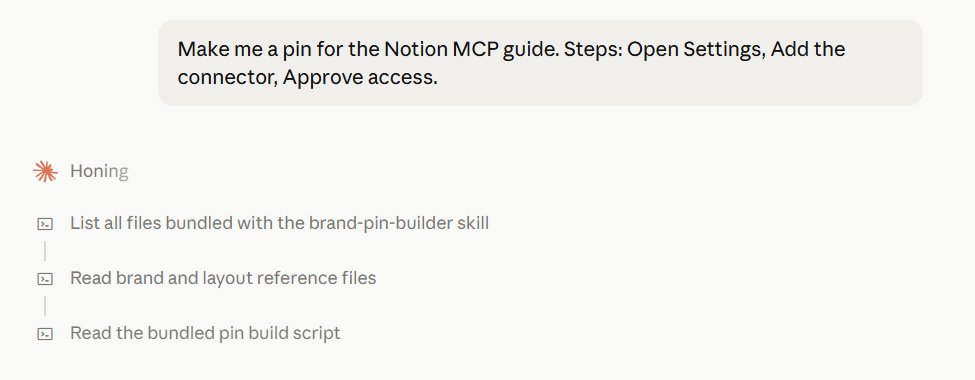
Three steps, in order: list the files in the Skill, read the brand and layout references, read the build script. Nothing about this Skill was in Claude’s context sixty seconds earlier. The instructions arrived because the request called for them.
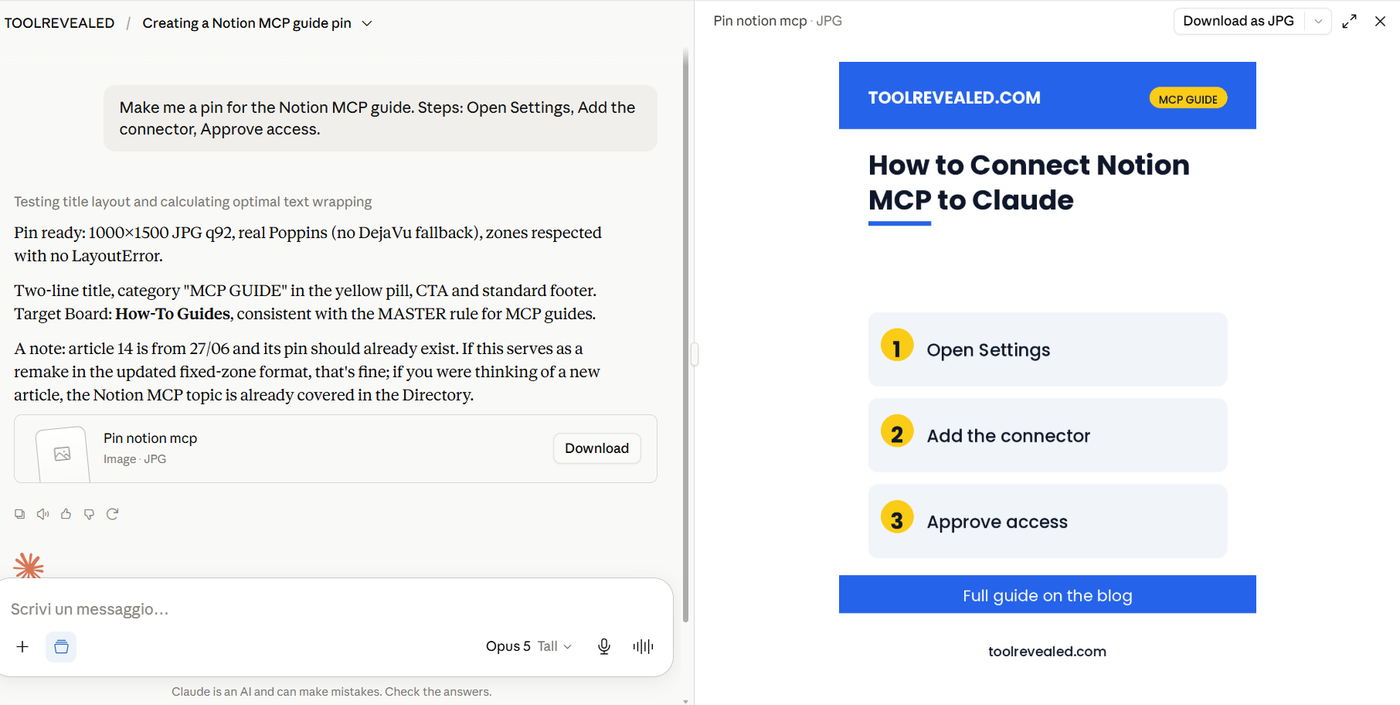
Then the graphic came out, correctly sized, in the right typeface, with the brand colours we never mentioned in the request.
The part that convinced us: it can refuse
Anyone can save a prompt. So we went looking for the thing a saved prompt cannot do.
We fed the same Skill a headline far too long for the space allowed. It did not shrink the font. It did not squeeze the text into the graphic and hope. It stopped, and said so:
LayoutError: title needs 446px, zone allows 360px.
Shorten the title; do not shrink the font.
That is the real difference. A prompt always gives you something back, and quite often that something is a broken graphic you then publish without looking twice. A Skill can carry a rule that fails loudly. Bad output that ships is worse than no output, and a Skill is where you put the guardrail that prevents it.
What it costs, and who is locked out
Custom Skills need code execution switched on in your settings, and they’re available on every plan — Free included. Anthropic’s help centre lists Free, Pro, Max, Team and Enterprise as supported for Skills, all requiring code execution enabled (checked 22 August 2026). That’s not how it worked when we first tested this in July, and it’s still not a completely flat rule: on Team and Enterprise, the toggle lives under Organization settings, not the individual Settings panel every other plan uses. But the headline claim we made earlier — that there’s nothing to try without paying — is no longer true, and it’s worth knowing that the door on Free is open.
Beyond the price, three limits are worth knowing before you invest an afternoon:
Skills don’t install themselves across surfaces. One uploaded in the web app still isn’t automatically available through the API, and one built in Claude Code is still a separate upload. Each surface wants its own copy. What has changed is what’s underneath: Anthropic published the Skill format itself — the SKILL.md structure — as an open standard at agentskills.io in December 2025, and it’s since been adopted well beyond Claude, including by Cursor, Codex CLI and GitHub Copilot. So the file travels — you can write one Skill and genuinely reuse it in other agent products — but the installation still doesn’t. “Portable” means the format, not a synced setting.
On an individual plan, a Skill still belongs to one person. If you’re on Free, Pro or Max, there’s no organisation-wide distribution and no admin panel — you upload it, you maintain it, and colleagues drift out of sync the moment you improve yours. That’s no longer the whole story on Team and Enterprise: Owners on those plans can now provision Skills for the entire organisation from a central panel, and those Skills appear automatically in everyone’s list with a team indicator, though individual users can still switch them off. If your team is on a personal plan each, the sync problem above is still yours to manage by hand.
Only install Skills you trust. A Skill is instructions plus executable code, so a malicious one can tell Claude to do things that have nothing to do with its stated purpose. Anthropic’s own guidance is to treat installing a Skill like installing software, and to read every bundled file first. That advice is worth taking literally, particularly for anything downloaded from a stranger.
One smaller inconsistency, since we are keeping score: the developer documentation says the description field allows up to 1024 characters, while the help centre article says 200. We stayed under 200 and had no trouble. If you write a long one and the Skill stops triggering, that gap is the first place to look.
So which one do you need?
Ask yourself one question: is the thing I’m missing access, or is it method?
If Claude cannot see your orders, your inbox, your calendar or your analytics, no Skill on earth will fix that. You need a connector. That is what connectors are for, and we have step-by-step guides for most of the ones worth having.
If Claude can already see everything it needs and you are simply tired of explaining, for the ninth time this month, how you want the thing formatted — that is a Skill. Write the instructions once, put the standards in a file next to them, and stop retyping.
And when you find yourself doing both — pulling live data and shaping it a particular way — use both. The connector fetches. The Skill decides what good looks like.
Our verdict
Skills are not a competitor to MCP and they are not a gimmick. They are the missing half. For anyone running a small operation where the same handful of jobs come round every week, this is the first Claude feature in a while that reduces work rather than adding a new thing to manage.
The setup cost is genuinely low: a text file, a clear description, a zip. The main risk is not technical. It is building one enormous Skill that tries to do everything, when several small focused ones would each trigger reliably.
Start with the job you are most tired of repeating. That one is your first Skill.
Building your stack with Claude?
The Claude MCP Playbook collects our tested setups into one practical guide. Founding price for early readers. Join the waitlist.
You Might Also Like
More tested guides on getting Claude connected to the tools you already use:
Related Posts