
Here’s something we found in our own dashboard tonight, not in a press release: Kit (formerly ConvertKit) now ships an official MCP server — and if you run a newsletter on Kit, it means Claude can read your subscriber data, analyze your broadcasts, and even draft and schedule emails for you. There’s a catch worth knowing before you go looking for it, though: it’s not in Claude’s connector directory. We checked. Here’s what Kit MCP actually is, how to connect it the right way, and the two traps that will waste your evening if you follow the wrong tutorial.
How We Found It (And Why That Matters)
We run our own email list on Kit — including the waitlist for an upcoming product. During a routine check of our account this week, a new entry appeared in the Automate menu: “Kit MCP — Connect your Kit account to your favorite AI tool.” No paid-feature badge, unlike almost everything else in that menu on Kit’s free plan.
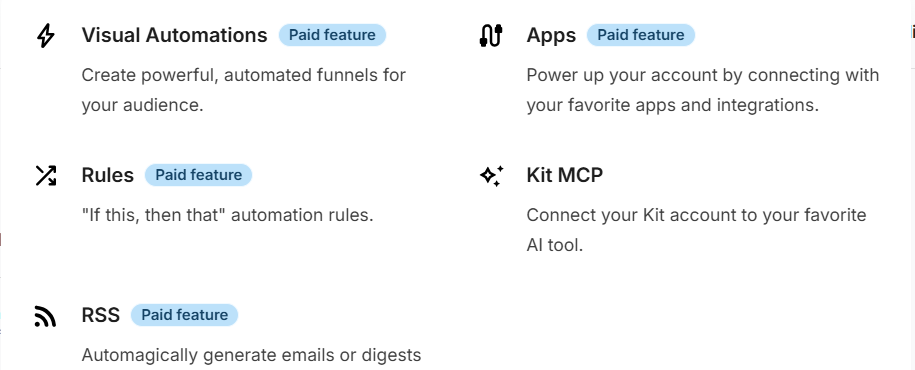
That’s notable on its own: Kit has gated Email Sequences, Visual Automations, Rules, and RSS behind paid plans — but the MCP connection appears to be available even on the free tier. For a small creator testing whether AI-assisted email marketing is worth it, that’s a genuinely low barrier to entry.
What Kit MCP Actually Does
Kit’s MCP server connects your Kit account to MCP-compatible AI tools — Claude, ChatGPT, Gemini, Cursor, and others. Once connected, the split of capabilities looks like this:
Read (ask anything about your list):
- Subscribers, segments, tags, and engagement stats
- Open rates and click data on every broadcast
- Sequence performance, step by step
- Conversion rates across forms and landing pages
- Purchases and commerce data
- Growth metrics across the whole account
Write (act on what you find):
- Tag and segment subscribers
- Add or update subscribers in bulk
- Enroll people into sequences
- Draft and schedule broadcasts
- Manage custom fields and forms
- Set up webhooks
In practice: “Which of my broadcasts performed best in the last 90 days, and why?” becomes a question you ask in a chat instead of an afternoon of CSV exports. And “tag everyone who clicked that link as engaged-reader” becomes one approved action instead of manual list surgery.
The Catch: It’s Not in Claude’s Directory
Here’s the part most coverage will skip. We searched Claude’s built-in connector directory for Kit — and it’s not there. Searching for newsletter and email marketing tools surfaces MailerLite and others, but no Kit.
This is the same situation we documented with X (Twitter) MCP: an official, first-party MCP server that exists and works, but hasn’t (yet) been listed in Claude’s one-click directory. The consequence is practical: you can’t just toggle it on from Claude’s connector list. You have to add it as a custom connector.
That’s not a red flag — it’s a first-party server from the company that holds your data, which is exactly what we recommend in our MCP security guide. It just means one extra step, and knowing the right URL.
How to Connect Kit MCP to Claude
Step 1: Find the MCP option in your Kit account
Log into Kit and open the Automate menu in the top navigation. You’ll see Kit MCP listed (“Connect your Kit account to your favorite AI tool”). This page gives you Kit’s MCP server URL and manages the connection on Kit’s side.
Step 2: Add it as a custom connector in Claude
In claude.ai, go to Settings → Connectors, scroll past the directory listings, and choose Add custom connector. Paste Kit’s MCP server URL:
https://app.kit.com/mcp
Step 3: Authorize the connection
You’ll be sent through Kit’s authorization flow — log in and approve. This is the consent screen moment: as always, read what you’re granting. Kit’s implementation lets you set permissions and revoke access anytime from your Kit account.
Step 4: Enable it in your chat and test
Open a new Claude conversation, click the + near the message box, toggle Kit on, and try:
“Give me a snapshot of my list: total subscribers, growth this month, and my three best-performing broadcasts.”
Real numbers from your real account means you’re connected.
Two Traps That Will Waste Your Evening
Trap 1: The deprecated community server. Before Kit shipped its official MCP, a community-built server (mcp-kit on GitHub) filled the gap — and it still ranks in search results. It’s now formally deprecated, with its own README telling users to migrate to the official server. If a tutorial has you generating a v4 API key and setting a KIT_API_KEY environment variable, you’re reading the old method. The official server handles authentication for you.
Trap 2: The two different Kit MCPs. Kit actually maintains two MCP servers: the one covered here (acts on your Kit account — subscribers, broadcasts, analytics) and a separate Kit Developer Docs MCP at developers.kit.com, which gives coding agents access to Kit’s API documentation. If you’re a creator managing your list, you want the first one. The docs server is for developers building Kit integrations — connecting it won’t show you a single subscriber.
Who This Is Actually For
The honest read: if your list has 50 subscribers, you don’t need AI analytics — you need more subscribers, and no connector fixes that. Kit MCP starts earning its place when your list is big enough that questions like “who are my most engaged readers?” or “which lead magnet converts best?” can’t be answered by scrolling.
Where it gets genuinely interesting is the write side, used carefully: drafting broadcasts in your voice from a chat, tagging based on behavior you describe in plain English, enrolling segments into sequences without touching the automation builder. Per the habits in our security guide: be generous with read, stingy with write, and keep approvals on — Kit’s own implementation is built around explicit approval before actions, which is exactly the right default.
FAQ
Is Kit MCP free?
The MCP connection itself appeared in our free-plan account without a paid badge. Kit’s plans still gate other features (sequences, automations), and what the AI can do depends on what your plan includes — but connecting doesn’t appear to require a paid tier.
Why isn’t Kit in Claude’s connector directory?
Only Kit and Anthropic know. Kit’s MCP is recent (“New” in their own navigation), and directory listing tends to lag behind server launches. The custom connector route works today; a directory listing may follow.
Can Claude send emails to my list without asking?
Actions require your approval — Kit’s implementation is explicitly built around “nothing happens without your approval,” and Claude asks before write actions by default. Keep it that way.
Does it work with ChatGPT and other AI tools too?
Yes — Kit advertises compatibility with Claude, ChatGPT, Gemini, Cursor, Windsurf, and Cline. This guide covers the Claude route; the server URL is the same everywhere.
The Bottom Line
Kit shipping a first-party MCP server — available even on the free plan, with a sane approval-based permission model — is exactly the direction we want email platforms to take. The absence from Claude’s directory is a speed bump, not a wall: one custom connector URL and you’re in. If Kit is where your list lives, this is worth the five minutes.
Every connector we cover — first-party or bridge, directory-listed or custom — is tracked in our MCP Directory, with honest notes on what each one really requires.
Building your MCP stack? We’re putting every tested guide into one Playbook — join the waitlist for founding pricing.
You Might Also Like
More tested guides from our MCP series:
Related Posts